
This is an old revision of the document!
Table of Contents
Logging for Cisco ISE
Unfortunately ISE can't generate custom logs in the format required (FTICKS) but, fortunately, it can generate syslog logs with the right information, which can be sent to a syslog server and munged into a suitable format.
This approach assumes that the member sites are configured to include their Operator-Name in RADIUS Requests.
Configuring Cisco ISE
This has been done with ISE 2.6 but the principle should apply to other versions.
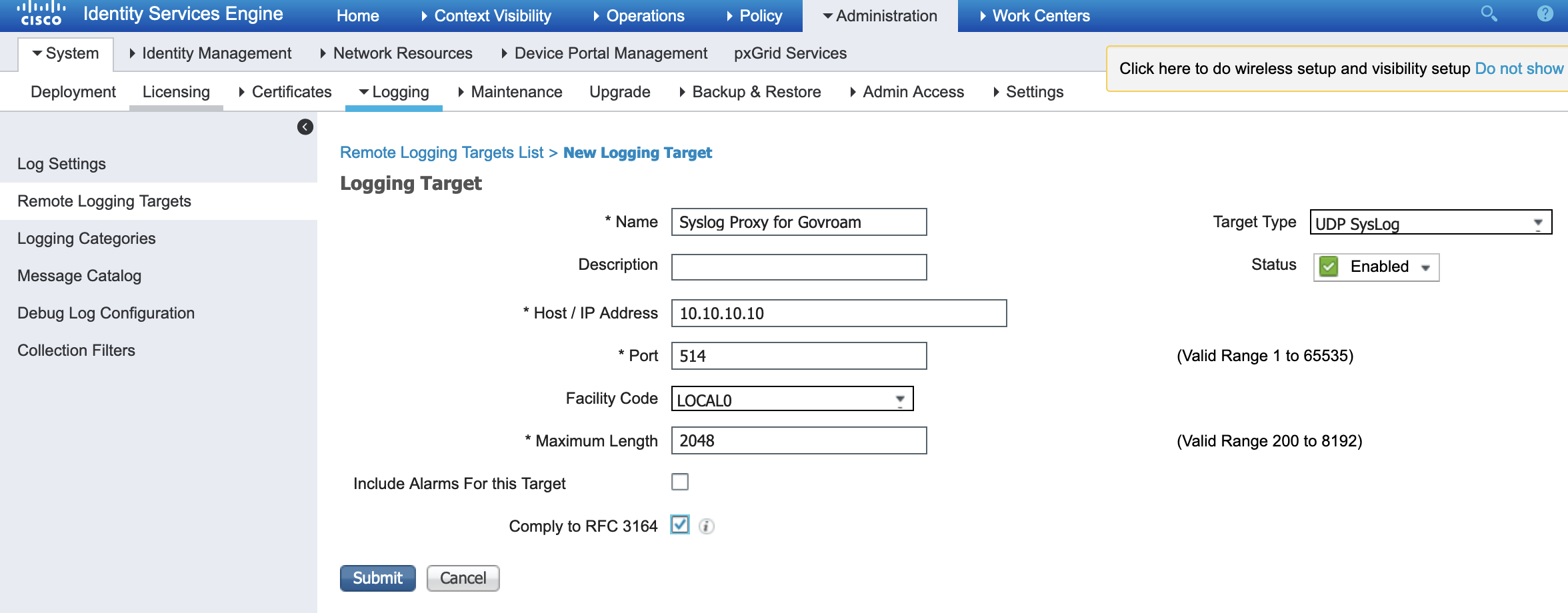
In Administration → System → Logging.
In Remote Logging Targets create a new Logging Target with the host name of your syslog server.
The Facility Code can be anything but make sure that it matches what the filters expect on the syslog server.
Maximum Length must be set higher than the default because the ISE log line exceeds 1024 bytes and gets split across multiple logs. 2048 seems to be high enough.
Enable Comply to RFC3164
In Logging Categories select Passed Authentications and add the new server to the Selected Targets.
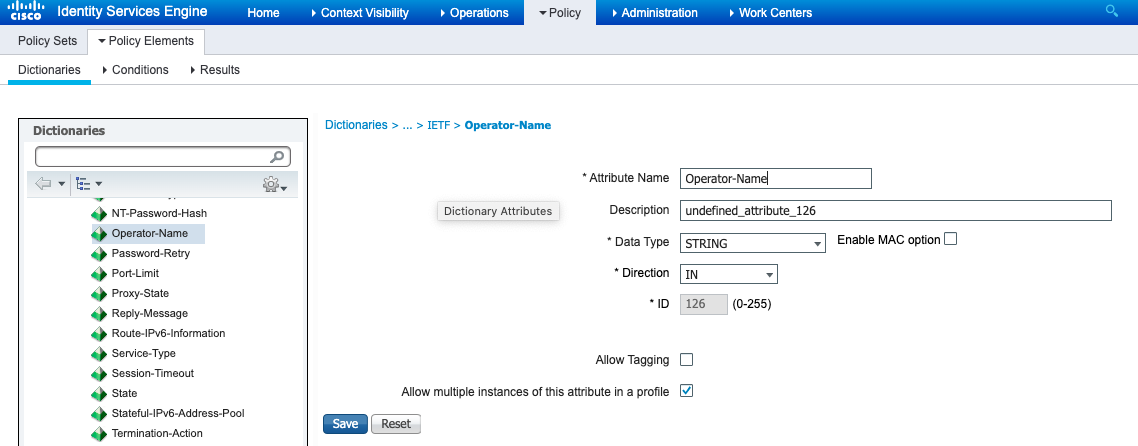
Configuring Syslog-NG
Syslog proxies
Here are two options for possible syslog servers and config but you set up any syslog server as long as it has the following behaviour:
- Proxies to utilities.govroam.uk on port 601/TCP
- Includes in the FTICKS '#FEDID=0X000#' where 0X000 is replaced by the Federation ID supplied.
- Filters down the proxied log to just those for
- Successful authentications
- Only authentications between member sites (i.e. NOT those to or from the Jisc NRPS)
The two options:
syslog-ng on Linux
source s_remote_udp {
  udp();
  unix-stream("/dev/log" max-connections(100));};
};

filter f_local3 {
  facility(local3);
};

rewrite r_realm {
  subst("@","",value("ISE.UserName"));
};

destination d_jisc {
  syslog("212.219.243.132"
        transport("tcp")
        port("601")
        template("F-TICKS/govroam/1.0#REALM=${ISE.UserName}#VISCOUNTRY=GB#VISINST=${ISE.Operator-Name}#CSI=${ISE.Calling-Station-ID}#RESULT=OK#FEDID=XXXXX#")
  );
};


log {
        source(s_remote_udp);
        filter(f_local3);
        filter{ match("Authentication succeeded" value ("MESSAGE"))};
        parser {
            kv-parser (prefix("ISE."));
        };
        filter{ "${ISE.NetworkDeviceName}" != "NRPS NAME"};
        filter{ "${ISE.SelectedAccessService}" != "NRPS NAME"};
        rewrite(r_realm);
        destination(d_jisc);
};
Replace the XXXXX with the Federation ID supplied.
Replace NRPS NAME with the NRPS name as defined in the Network Devices and the External RADIUS Servers respectively.
NXLog on Windows
- Install NXLog CE on Windows
- Use this configuration (with paths changed appropriately)
Panic Soft
#NoFreeOnExit TRUE

define ROOT     C:\Program Files (x86)\nxlog
define CERTDIR  %ROOT%\cert
define CONFDIR  %ROOT%\conf
define LOGDIR   %ROOT%\data
define LOGFILE  %LOGDIR%\nxlog.log
LogFile %LOGFILE%

Moduledir %ROOT%\modules
CacheDir  %ROOT%\data
Pidfile   %ROOT%\data\nxlog.pid
SpoolDir  %ROOT%\data

<Extension _syslog>
    Module      xm_syslog
</Extension>

<Extension _exec>
    Module      xm_exec
</Extension>

<Input tcp_ise>
    Module im_tcp
    Host  10.10.10.10
    Port  514
    <Exec>
      if $SyslogFacility != "local6" drop();
      if $raw_event !~ /CISE_Passed_Authentications/ drop();
      $FedID="0X000";
    </Exec>
</Input>

<Output syslog_tls>
    Module      om_ssl
    Host        212.219.243.132
    Port        6514
#   CAFile      c:/Program Files (x86)/nxlog/data/cacert.pem
#    CertFile    c:/Program Files (x86)/nxlog/data/clientreq.pem
#    CertKeyFile c:/Program Files (x86)/nxlog/data/clientkey.pem
    AllowUntrusted 1
    OutputType	Syslog_TLS
    Exec        to_syslog_ietf();
</Output>

<Output syslog_tcp>
    Module      om_tcp
    Host        212.219.243.132
    Port        601
    OutputType  Syslog_TLS
    Exec        to_syslog_ietf();
    Exec        $SyslogFacility = "local6";
</Output>


<Route 1>
    Path		tcp_ise => syslog_tcp
</Route>
- Change 0X000 to the supplied Federation ID.
- Change the 'Host' in 'Input tcp_ise' to the address of the ISE host.
- (Ignore the syslog_tls part, that's for future use)
- Restart the Service